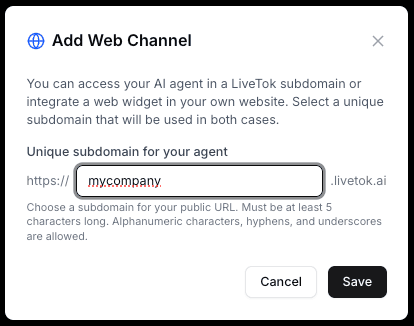
Web Channel Configuration

Configure your LiveTok AI chat widget for your website. Provide instant customer engagement with a fully customizable web chat interface.

Overview

The Web channel provides:

  • Instant Deployment - Add to any website with one line of code
  • Text Messaging Only - Text-based conversations (voice coming soon)
  • Fully Customizable Appearance - Match your brand colors, position, and style
  • JavaScript API - Programmatic control and integration
  • Mobile Responsive - Works seamlessly on all devices
  • No Page Reload - Persistent conversations across pages

Quick Start

Basic Installation

The simplest way to add LiveTok to your website:

<!-- Add before closing </body> tag -->
<script src="https://cdn.livetok.ai/widget.js"
        data-agent-id="your-agent-id"></script>
```text
 
**That's it!** The widget will appear on your site.
 
**[Screenshot placeholder: Basic widget on website]**
 
## Widget Configuration
 
### Visual Customization
 
#### Theme Colors
 
Customize the widget appearance:
 
**Primary Color:**
The main theme color for the widget header, buttons, and user messages.
 
```html
<script src="https://cdn.livetok.ai/widget.js"
        data-agent-id="your-agent-id"
        data-primary-color="#0066FF"></script>
```text
 
**Advanced Color Customization:**
 
```javascript
LiveTok.init({
  agentId: 'your-agent-id',
  theme: {
    primaryColor: '#0066FF',
    secondaryColor: '#F0F0F0',
    textColor: '#333333',
    backgroundColor: '#FFFFFF',
    userMessageColor: '#0066FF',
    botMessageColor: '#F5F5F5',
    headerTextColor: '#FFFFFF'
  }
});
```text
 
**[Screenshot placeholder: Widget with custom colors]**
 
#### Widget Position
 
**Available Positions:**
- `bottom-right` (default)
- `bottom-left`
- `top-right`
- `top-left`
 
```html
<script src="https://cdn.livetok.ai/widget.js"
        data-agent-id="your-agent-id"
        data-position="bottom-right"></script>
```text
 
#### Widget Size
 
**Responsive Sizes:**
 
```javascript
LiveTok.init({
  agentId: 'your-agent-id',
  size: {
    // Desktop
    desktop: {
      width: '400px',
      height: '600px'
    },
    // Mobile (auto-detected)
    mobile: {
      width: '100%',
      height: '100%'
    }
  }
});
```text
 
#### Custom Branding
 
**Add your logo and branding:**
 
```javascript
LiveTok.init({
  agentId: 'your-agent-id',
  branding: {
    companyName: 'Your Company',
    logo: 'https://yoursite.com/logo.png',
    agentAvatar: 'https://yoursite.com/avatar.png',
    showPoweredBy: false // Remove "Powered by LiveTok"
  }
});
```text
 
**[Screenshot placeholder: Fully branded widget]**
 
### Chat Behavior
 
#### Greeting Message
 
Set the initial message customers see:
 
```javascript
LiveTok.init({
  agentId: 'your-agent-id',
  greeting: {
    enabled: true,
    message: 'Hi! 👋 How can we help you today?',
    delay: 2000 // Show after 2 seconds
  }
});
```text
 
#### Welcome Screen
 
Show a welcome screen before chat:
 
```javascript
LiveTok.init({
  agentId: 'your-agent-id',
  welcomeScreen: {
    enabled: true,
    title: 'Welcome to Support',
    subtitle: 'We typically reply in a few minutes',
    buttonText: 'Start Chat',
    image: 'https://yoursite.com/welcome.png'
  }
});
```text
 
**[Screenshot placeholder: Welcome screen example]**
 
#### Auto-Open Behavior
 
Configure when the widget automatically opens:
 
```javascript
LiveTok.init({
  agentId: 'your-agent-id',
  autoOpen: {
    enabled: true,
    delay: 5000, // After 5 seconds
    trigger: 'time', // 'time', 'scroll', or 'exit-intent'
    scrollPercentage: 50, // For scroll trigger
    repeatDelay: 86400000 // Don't repeat for 24 hours
  }
});
```text
 
**Trigger Options:**
- `time` - After specified delay
- `scroll` - When user scrolls to percentage
- `exit-intent` - When user attempts to leave page
- `custom` - Trigger programmatically
 
#### Proactive Messages
 
Send proactive messages based on user behavior:
 
```javascript
LiveTok.init({
  agentId: 'your-agent-id',
  proactiveMessages: [
    {
      trigger: 'pageTime',
      delay: 30000, // After 30 seconds
      message: 'Need help finding something?',
      pages: ['/products', '/pricing'] // Specific pages only
    },
    {
      trigger: 'scrollDepth',
      scrollPercentage: 75,
      message: 'Have questions about our plans?',
      pages: ['/pricing']
    }
  ]
});
```text
 
**[Screenshot placeholder: Proactive message example]**
 
### Message Features
 
#### Text Messages
 
The widget supports text-based conversations:
 
**Text Formatting:**
- **Bold**, *italic*, ~~strikethrough~~
- `Code`, ```code blocks```
- [Links](https://example.com)
- Emojis 😊
 
#### Typing Indicators
 
Show when agent is typing:
 
```javascript
LiveTok.init({
  agentId: 'your-agent-id',
  typingIndicator: {
    enabled: true,
    showAgentTyping: true,
    showUserTyping: false
  }
});
```text
 
#### Message Timestamps
 
Configure timestamp display:
 
```javascript
LiveTok.init({
  agentId: 'your-agent-id',
  timestamps: {
    enabled: true,
    format: 'relative', // 'relative' or 'absolute'
    showOnEveryMessage: false // Only show on hover
  }
});
```text
 
## Advanced Configuration
 
### JavaScript API
 
Control the widget programmatically:
 
#### Initialization
 
```javascript
LiveTok.init({
  agentId: 'your-agent-id',
  // All configuration options
});
```text
 
#### Methods
 
**Open/Close Widget:**
 
```javascript
// Open the widget
LiveTok.open();
 
// Close the widget
LiveTok.close();
 
// Toggle widget
LiveTok.toggle();
```text
 
**Send Messages:**
 
```javascript
// Send a message from code
LiveTok.sendMessage('Hello from my app!');
 
// Send with metadata
LiveTok.sendMessage('Customer question', {
  userId: '12345',
  page: window.location.pathname,
  customData: { plan: 'pro' }
});
```text
 
**Show/Hide Widget:**
 
```javascript
// Completely hide widget
LiveTok.hide();
 
// Show widget again
LiveTok.show();
 
// Check if visible
const isVisible = LiveTok.isVisible();
```text
 
**Update Configuration:**
 
```javascript
// Change settings on the fly
LiveTok.updateConfig({
  primaryColor: '#FF0000',
  greeting: 'New greeting message'
});
```text
 
**User Identification:**
 
```javascript
// Identify logged-in users
LiveTok.identify({
  userId: '12345',
  email: 'customer@example.com',
  name: 'John Doe',
  phone: '+1234567890',
  customAttributes: {
    plan: 'pro',
    signupDate: '2024-01-01',
    ltv: 5000
  }
});
```text
 
**Clear User Data:**
 
```javascript
// Clear identification (on logout)
LiveTok.logout();
```text
 
**[Screenshot placeholder: JavaScript console with API examples]**
 
#### Events
 
Listen to widget events:
 
```javascript
// Widget opened
LiveTok.on('open', function() {
  console.log('Widget opened');
  // Track in analytics
  gtag('event', 'chat_opened');
});
 
// Widget closed
LiveTok.on('close', function() {
  console.log('Widget closed');
});
 
// Message sent by user
LiveTok.on('messageSent', function(message) {
  console.log('User sent:', message);
});
 
// Message received from agent
LiveTok.on('messageReceived', function(message) {
  console.log('Agent replied:', message);
});
 
// Conversation started
LiveTok.on('conversationStart', function(conversationId) {
  console.log('New conversation:', conversationId);
});
 
// Conversation ended
LiveTok.on('conversationEnd', function(conversationId) {
  console.log('Conversation ended:', conversationId);
});
 
// Agent started typing
LiveTok.on('agentTyping', function() {
  console.log('Agent is typing...');
});
 
// Button clicked
LiveTok.on('buttonClick', function(button) {
  console.log('Button clicked:', button);
});
 
// File uploaded
LiveTok.on('fileUploaded', function(file) {
  console.log('File uploaded:', file);
});
```text
 
### Context & Personalization
 
#### Page Context
 
Automatically pass page context to agent:
 
```javascript
LiveTok.init({
  agentId: 'your-agent-id',
  context: {
    autoCapture: true, // Automatically capture page info
    pageTitle: document.title,
    pageUrl: window.location.href,
    referrer: document.referrer,
    userAgent: navigator.userAgent
  }
});
```text
 
#### Custom Context
 
Pass custom data to the agent:
 
```javascript
LiveTok.init({
  agentId: 'your-agent-id',
  customData: {
    // E-commerce context
    cartTotal: 159.99,
    itemsInCart: 3,
    lastViewedProduct: 'Blue Sneakers',
 
    // User context
    userType: 'premium',
    accountAge: '2 years',
 
    // Page context
    pageCategory: 'checkout',
    experimentVariant: 'A'
  }
});
```text
 
The agent can use this context to provide personalized responses.
 
#### Dynamic Context
 
Update context as user navigates:
 
```javascript
// Update when cart changes
document.addEventListener('cartUpdated', function(event) {
  LiveTok.updateContext({
    cartTotal: event.detail.total,
    itemsInCart: event.detail.count
  });
});
 
// Update on page navigation (SPA)
router.afterEach((to) => {
  LiveTok.updateContext({
    pageUrl: to.fullPath,
    pageTitle: to.meta.title
  });
});
```text
 
### Pre-Chat Form
 
Collect information before chat starts:
 
```javascript
LiveTok.init({
  agentId: 'your-agent-id',
  preChatForm: {
    enabled: true,
    required: true, // Must fill before chatting
    title: 'Start a Conversation',
    subtitle: 'Please tell us a bit about yourself',
    fields: [
      {
        type: 'text',
        name: 'name',
        label: 'Name',
        placeholder: 'John Doe',
        required: true
      },
      {
        type: 'email',
        name: 'email',
        label: 'Email',
        placeholder: 'john@example.com',
        required: true
      },
      {
        type: 'tel',
        name: 'phone',
        label: 'Phone',
        placeholder: '+1 (555) 123-4567',
        required: false
      },
      {
        type: 'select',
        name: 'topic',
        label: 'How can we help?',
        options: [
          { value: 'sales', label: 'Sales Inquiry' },
          { value: 'support', label: 'Technical Support' },
          { value: 'billing', label: 'Billing Question' },
          { value: 'other', label: 'Other' }
        ],
        required: true
      },
      {
        type: 'textarea',
        name: 'message',
        label: 'Message',
        placeholder: 'How can we help you?',
        required: false
      }
    ]
  }
});
```text
 
**[Screenshot placeholder: Pre-chat form example]**
 
### Language Settings
 
Configure language support:
 
```javascript
LiveTok.init({
  agentId: 'your-agent-id',
  language: {
    default: 'en', // Default language
    autoDetect: true, // Auto-detect from browser
    supported: ['en', 'es', 'fr', 'de'], // Supported languages
 
    // Custom translations for UI
    translations: {
      en: {
        placeholder: 'Type your message...',
        send: 'Send',
        close: 'Close',
        minimize: 'Minimize'
      },
      es: {
        placeholder: 'Escribe tu mensaje...',
        send: 'Enviar',
        close: 'Cerrar',
        minimize: 'Minimizar'
      }
    }
  }
});
```text
 
### Mobile Optimization
 
Optimize for mobile devices:
 
```javascript
LiveTok.init({
  agentId: 'your-agent-id',
  mobile: {
    // Full screen on mobile
    fullScreen: true,
 
    // Show as overlay on mobile
    overlay: true,
 
    // Hide on small screens
    hideOn: {
      width: 320 // Hide if screen < 320px
    },
 
    // Mobile-specific styling
    mobileStyles: {
      fontSize: '16px', // Prevent zoom on input
      padding: '10px'
    }
  }
});
```text
 
**[Screenshot placeholder: Mobile widget examples]**
 
## Platform-Specific Integration
 
### React Integration
 
Install the React package:
 
```bash
npm install @livetok/widget-react
```text
 
Use in your component:
 
```jsx
import { LiveTokWidget } from '@livetok/widget-react';
 
function App() {
  const handleOpen = () => {
    console.log('Widget opened');
  };
 
  return (
    <div>
      <LiveTokWidget
        agentId="your-agent-id"
        primaryColor="#0066FF"
        onOpen={handleOpen}
        customData={{
          userId: user.id,
          plan: user.plan
        }}
      />
    </div>
  );
}
```text
 
**With Hooks:**
 
```jsx
import { useLiveTok } from '@livetok/widget-react';
 
function ChatButton() {
  const { open, close, sendMessage } = useLiveTok();
 
  return (
    <button onClick={() => {
      open();
      sendMessage('Hello from React!');
    }}>
      Open Chat
    </button>
  );
}
```text
 
### Vue.js Integration
 
Install the Vue package:
 
```bash
npm install @livetok/widget-vue
```text
 
```vue
<template>
  <LiveTokWidget
    :agent-id="agentId"
    :primary-color="primaryColor"
    @open="handleOpen"
    :custom-data="customData"
  />
</template>
 
<script>
import { LiveTokWidget } from '@livetok/widget-vue';
 
export default {
  components: { LiveTokWidget },
  data() {
    return {
      agentId: 'your-agent-id',
      primaryColor: '#0066FF',
      customData: {
        userId: this.$store.state.user.id
      }
    };
  },
  methods: {
    handleOpen() {
      console.log('Widget opened');
    }
  }
};
</script>
```text
 
### Next.js Integration
 
```jsx
// components/LiveTokWidget.js
import dynamic from 'next/dynamic';
 
const LiveTokWidget = dynamic(
  () => import('@livetok/widget-react').then(mod => mod.LiveTokWidget),
  { ssr: false } // Disable server-side rendering
);
 
export default function ChatWidget() {
  return (
    <LiveTokWidget
      agentId={process.env.NEXT_PUBLIC_LIVETOK_AGENT_ID}
      primaryColor="#0066FF"
    />
  );
}
```text
 
```jsx
// pages/_app.js
import ChatWidget from '../components/LiveTokWidget';
 
function MyApp({ Component, pageProps }) {
  return (
    <>
      <Component {...pageProps} />
      <ChatWidget />
    </>
  );
}
```text
 
### WordPress Integration
 
**Method 1: Plugin (Recommended)**
 
1. Download LiveTok WordPress Plugin
2. Go to **Plugins** > **Add New** > **Upload Plugin**
3. Upload and activate
4. Go to **Settings** > **LiveTok**
5. Enter your Agent ID
6. Customize appearance
7. Save changes
 
**Method 2: Manual**
 
1. Install "Insert Headers and Footers" plugin
2. Go to **Settings** > **Insert Headers and Footers**
3. Add to footer:
 
```html
<script src="https://cdn.livetok.ai/widget.js"
        data-agent-id="your-agent-id"></script>
```text
 
### Shopify Integration
 
1. Go to **Online Store** > **Themes**
2. Click **Actions** > **Edit code**
3. Find `theme.liquid`
4. Add before `</body>`:
 
```liquid
<script src="https://cdn.livetok.ai/widget.js"
        data-agent-id="your-agent-id"></script>
 
<script>
  // Pass Shopify context
  LiveTok.init({
    agentId: 'your-agent-id',
    customData: {
      {% if customer %}
        customerId: '{{ customer.id }}',
        customerEmail: '{{ customer.email }}',
        customerName: '{{ customer.name }}',
      {% endif %}
      shop: '{{ shop.name }}',
      currency: '{{ shop.currency }}'
    }
  });
</script>
```text
 
5. Save
 
**[Screenshot placeholder: Shopify integration]**
 
### Webflow Integration
 
1. Go to **Project Settings** > **Custom Code**
2. Add to **Footer Code**:
 
```html
<script src="https://cdn.livetok.ai/widget.js"
        data-agent-id="your-agent-id"></script>
```text
 
3. Publish site
 
### Google Tag Manager
 
1. Go to **Tags** > **New**
2. Tag Type: **Custom HTML**
3. Add code:
 
```html
<script src="https://cdn.livetok.ai/widget.js"
        data-agent-id="your-agent-id"></script>
```text
 
4. Trigger: **All Pages**
5. Save and publish
 
## Testing
 
### Test Checklist
 
- [ ] Widget loads on all pages
- [ ] Widget displays in correct position
- [ ] Colors match brand
- [ ] Mobile responsive
- [ ] Messages send and receive
- [ ] Buttons work correctly
- [ ] File upload works
- [ ] Pre-chat form submits
- [ ] Context data passes correctly
- [ ] Events fire properly
- [ ] Works in all target browsers
- [ ] No JavaScript errors
- [ ] No layout conflicts
- [ ] Performance is acceptable
 
### Browser Testing
 
Test in major browsers:
 
- Chrome (latest)
- Firefox (latest)
- Safari (latest)
- Edge (latest)
- Mobile Safari (iOS)
- Mobile Chrome (Android)
 
### Performance Testing
 
Monitor performance impact:
 
```javascript
// Measure load time
const start = performance.now();
LiveTok.init({ agentId: 'your-agent-id' });
LiveTok.on('ready', () => {
  const loadTime = performance.now() - start;
  console.log('Widget loaded in', loadTime, 'ms');
});
```text
 
**Performance Benchmarks:**
- Initial load: < 100ms
- Widget size: ~45KB gzipped
- No impact on page load speed
- Lazy loads until opened
 
**[Screenshot placeholder: Performance metrics]**
 
## Analytics Integration
 
### Google Analytics
 
Track widget interactions:
 
```javascript
LiveTok.on('open', () => {
  gtag('event', 'chat_opened', {
    'event_category': 'engagement',
    'event_label': 'widget'
  });
});
 
LiveTok.on('messageSent', (message) => {
  gtag('event', 'chat_message_sent', {
    'event_category': 'engagement',
    'event_label': message.text.substring(0, 50)
  });
});
 
LiveTok.on('conversationStart', () => {
  gtag('event', 'chat_conversation_started', {
    'event_category': 'conversion'
  });
});
```text
 
### Segment
 
```javascript
LiveTok.on('conversationStart', () => {
  analytics.track('Chat Conversation Started', {
    source: 'web_widget',
    page: window.location.pathname
  });
});
 
LiveTok.on('conversationEnd', () => {
  analytics.track('Chat Conversation Ended');
});
```text
 
### Mixpanel
 
```javascript
LiveTok.on('open', () => {
  mixpanel.track('Widget Opened');
});
 
LiveTok.on('buttonClick', (button) => {
  mixpanel.track('Chat Button Clicked', {
    button_text: button.text,
    button_action: button.action
  });
});
```text
 
## Security & Privacy
 
### Data Privacy
 
**GDPR Compliance:**
 
```javascript
LiveTok.init({
  agentId: 'your-agent-id',
  privacy: {
    // Show privacy notice
    showNotice: true,
    noticeText: 'We use cookies and collect data to improve your experience.',
    noticeLink: 'https://yoursite.com/privacy',
 
    // Require consent
    requireConsent: true,
    consentText: 'I agree to the privacy policy',
 
    // Data retention
    dataRetention: 90 // days
  }
});
```text
 
**Cookie Settings:**
 
```javascript
LiveTok.init({
  agentId: 'your-agent-id',
  cookies: {
    enabled: true,
    secure: true, // HTTPS only
    sameSite: 'strict',
    domain: '.yoursite.com'
  }
});
```text
 
### Content Security Policy
 
Add to your CSP headers:
 
```text
script-src 'self' https://cdn.livetok.ai;
connect-src 'self' https://api.livetok.ai wss://ws.livetok.ai;
img-src 'self' https://cdn.livetok.ai data:;
```text
 
## Troubleshooting
 
### Widget Not Showing
 
**Check:**
1. Agent ID is correct
2. Script tag is before `</body>`
3. No JavaScript errors in console
4. Widget not hidden by CSS
5. Domain is whitelisted (if configured)
 
### Styling Issues
 
**CSS Conflicts:**
 
```javascript
// Use shadow DOM to isolate styles
LiveTok.init({
  agentId: 'your-agent-id',
  useShadowDOM: true
});
```text
 
**Custom CSS Override:**
 
```css
/* Target widget container */
#livetok-widget {
  z-index: 99999 !important;
}
 
/* Target specific elements */
.livetok-header {
  font-family: 'Your Font', sans-serif !important;
}
```text
 
### Performance Issues
 
**Lazy Load:**
 
```javascript
// Load widget only when needed
document.getElementById('chatButton').addEventListener('click', () => {
  const script = document.createElement('script');
  script.src = 'https://cdn.livetok.ai/widget.js';
  script.dataset.agentId = 'your-agent-id';
  document.body.appendChild(script);
});
```text
 
### Mobile Issues
 
**Viewport Fix:**
 
```html
<meta name="viewport" content="width=device-width, initial-scale=1,
      maximum-scale=1, user-scalable=no">
```text
 
**iOS Keyboard Issues:**
 
```javascript
LiveTok.init({
  agentId: 'your-agent-id',
  mobile: {
    fixIOSKeyboard: true // Fixes keyboard covering input
  }
});
```text
 
## Best Practices
 
### Placement
- Use bottom-right for most sites (familiar to users)
- Avoid covering important CTAs
- Test on all breakpoints
 
### Timing
- Don't auto-open immediately (intrusive)
- Use proactive messages thoughtfully
- Consider exit-intent for abandoned carts
 
### Performance
- Load asynchronously
- Lazy load if possible
- Monitor performance impact
 
### Accessibility
- Widget is keyboard navigable
- Screen reader compatible
- High contrast mode supported
- ARIA labels included
 
## Next Steps
 
- [Configure WhatsApp Channel](/channels/whatsapp)
- [Set Up Telephony](/channels/telephony)
- [Add Integrations](/integrations)
- [Build Knowledge Base](/knowledge-base)
- [View Analytics](/reporting)
 
## Support
 
Need help with Web widget configuration?
- Contact support at support@livetok.ai
- Check [Developer Documentation](/developers)
- Review [API Reference](/developers/api)