Voices & Languages
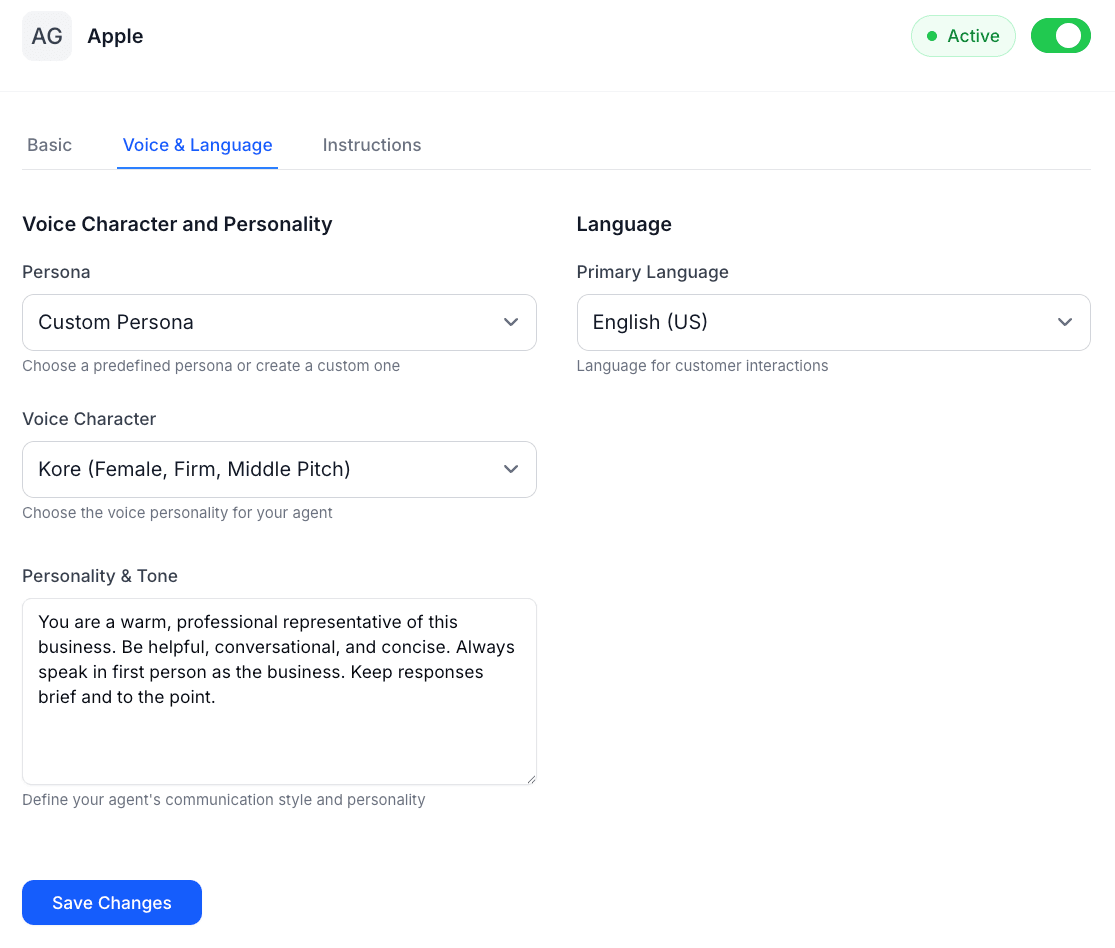
Configure your AI Agent’s voice characteristics and language support to create natural, localized customer interactions.
Overview
The Voices & Languages configuration defines how your AI Agent sounds (for voice channels) and which languages it can understand and speak. This includes selecting voice profiles, setting language preferences, and configuring multilingual behavior.
Voice Configuration
Available Voices
For telephony channels, choose from a variety of natural-sounding AI voices:
English Voices:
- Alloy - Neutral, professional tone (Default)
- Echo - Warm, friendly personality
- Fable - Confident, clear articulation
- Onyx - Deep, authoritative presence
- Nova - Energetic, personable style
- Shimmer - Calm, reassuring manner
Voice Properties:
Speaking Rate: Adjust how fast or slow your agent speaks (0.75x to 1.5x normal speed). A moderate pace (1.0x) works well for most use cases, while slower speeds can help with technical explanations or customers who need more time to process information.
Voice Stability: Control the consistency of the voice output. Higher stability results in more predictable, uniform speech, while lower stability can add more natural variation and expressiveness to the conversation.
Language Support
Supported Languages
LiveTok AI Agents support 25+ languages for both understanding customer input and generating responses:
Major Languages:
- English (US, UK, Australian, Canadian)
- Spanish (Spain, Latin America)
- French (France, Canadian)
- German
- Italian
- Portuguese (Brazil, Portugal)
- Chinese (Mandarin, Cantonese)
- Japanese
- Korean
- Arabic
- Hindi
- Russian
- Dutch
- Polish
- Turkish
- Swedish
- Norwegian
- Danish
- Finnish
Language Detection
Automatic Language Detection: Enable automatic language detection to have your AI Agent identify and respond in the customer’s preferred language. The agent analyzes the first message to detect the language and continues the conversation in that language.
Primary Language: Set your agent’s default language for initiating conversations and handling cases where language detection is uncertain.
Fallback Language: Define which language the agent should use if it cannot confidently detect the customer’s language or if the detected language is not in your supported languages list.
Personality Configuration
Tone and Style
Communication Style: Define how your agent communicates with customers:
Professional: Formal, business-appropriate language suitable for corporate environments, financial services, or legal contexts. Uses complete sentences, proper grammar, and avoids casual expressions.
Friendly: Warm and approachable while maintaining professionalism. Suitable for retail, hospitality, and customer service. Uses conversational language with occasional friendly expressions.
Casual: Relaxed, informal tone appropriate for younger demographics or lifestyle brands. Can use contractions, casual phrases, and a more conversational approach.
Custom: Define your own communication style with specific guidelines about vocabulary, sentence structure, and expressions to use or avoid.
Brand Voice
Personality Traits: Define 3-5 key personality traits that reflect your brand identity. For example:
- Helpful and patient
- Knowledgeable and confident
- Friendly and enthusiastic
- Professional and efficient
- Empathetic and understanding
Language Guidelines: Specify particular words, phrases, or expressions your agent should use or avoid to maintain brand consistency.
Example:
Use: "Happy to help!" instead of "No problem"
Use: "Let me look into that for you" instead of "One moment"
Avoid: Overly technical jargon
Avoid: Negative phrases like "I can't" (use "Let me find an alternative")
Configuration Steps
Setting Up Voice (Telephony)
- Navigate to Agent Configuration > Voices & Languages
- In the Voice section, select your preferred voice profile
- Adjust speaking rate if needed (default: 1.0x)
- Set voice stability (default: Medium)
- Test the voice with sample phrases
- Save configuration
Configuring Languages
- Navigate to Agent Configuration > Voices & Languages
- Set your Primary Language (the default language for your agent)
- Enable Automatic Language Detection if supporting multiple languages
- Select Supported Languages from the list
- Set a Fallback Language for uncertain detections
- Configure language-switching behavior
- Save configuration
Defining Personality
- Navigate to Agent Configuration > Voices & Languages
- In the Personality section, select your communication style
- Add 3-5 personality traits
- Define language guidelines (words/phrases to use or avoid)
- Add any brand-specific communication rules
- Test with sample conversations
- Save configuration
Multi-Language Best Practices
Regional Considerations: Different regions may have specific cultural expectations for customer service interactions. Consider local customs when configuring personality and tone for each language.
Consistent Brand Voice: While adapting to cultural contexts, maintain your core brand personality across all languages. A friendly brand should be friendly in all supported languages.
Test Each Language: Before going live, test conversations in each supported language to ensure the agent responds naturally and accurately.
Language-Specific Knowledge: For region-specific information (like local holidays, regulations, or offerings), ensure your knowledge base includes content for each language market.
Examples
Professional Service Business
Voice: Onyx (authoritative, professional)
Speaking Rate: 1.0x
Primary Language: English (US)
Communication Style: Professional
Personality Traits:
- Knowledgeable and confident
- Clear and direct
- Professional and efficient
Retail/E-commerce
Voice: Nova (energetic, friendly)
Speaking Rate: 1.1x
Primary Language: English (US)
Supported Languages: English, Spanish, French
Auto-Detect: Enabled
Communication Style: Friendly
Personality Traits:
- Helpful and enthusiastic
- Patient and understanding
- Positive and encouraging
Healthcare
Voice: Shimmer (calm, reassuring)
Speaking Rate: 0.9x (slightly slower)
Primary Language: English (US)
Communication Style: Professional with empathy
Personality Traits:
- Empathetic and caring
- Patient and understanding
- Professional and trustworthy
- Clear and reassuring
Testing Your Configuration
Voice Testing
For telephony channels, test how your selected voice sounds:
- Go to Test Voice in the configuration panel
- Enter sample phrases typical of your business
- Listen to how the voice delivers different types of messages
- Adjust speaking rate or try different voices if needed
- Test with various message lengths and complexities
Language Testing
Test language detection and response quality:
- Send test messages in each supported language
- Verify the agent correctly detects the language
- Check that responses are natural and accurate
- Test language switching mid-conversation
- Verify fallback behavior with unsupported languages
Personality Testing
Verify personality consistency:
- Have conversations about different topics
- Check that the agent maintains consistent tone
- Verify brand voice guidelines are followed
- Test with various conversation scenarios (simple, complex, escalation)
- Review conversation logs for consistency
Troubleshooting
Voice sounds unnatural:
- Try a different voice profile
- Adjust speaking rate (slower often sounds more natural)
- Check that your text doesn’t include special characters or formatting
Language detection errors:
- Ensure the first customer message is substantial enough (not just “hi”)
- Check that the language is in your supported languages list
- Verify customer is using standard language (not heavy slang or mixed languages)
Personality inconsistent:
- Review your personality guidelines for clarity
- Ensure guidelines don’t contradict each other
- Test with more specific instructions if needed
- Check that your knowledge base content aligns with personality settings