Channels Overview
LiveTok enables you to engage with customers across multiple channels with a single AI Agent. Deploy once, connect everywhere.
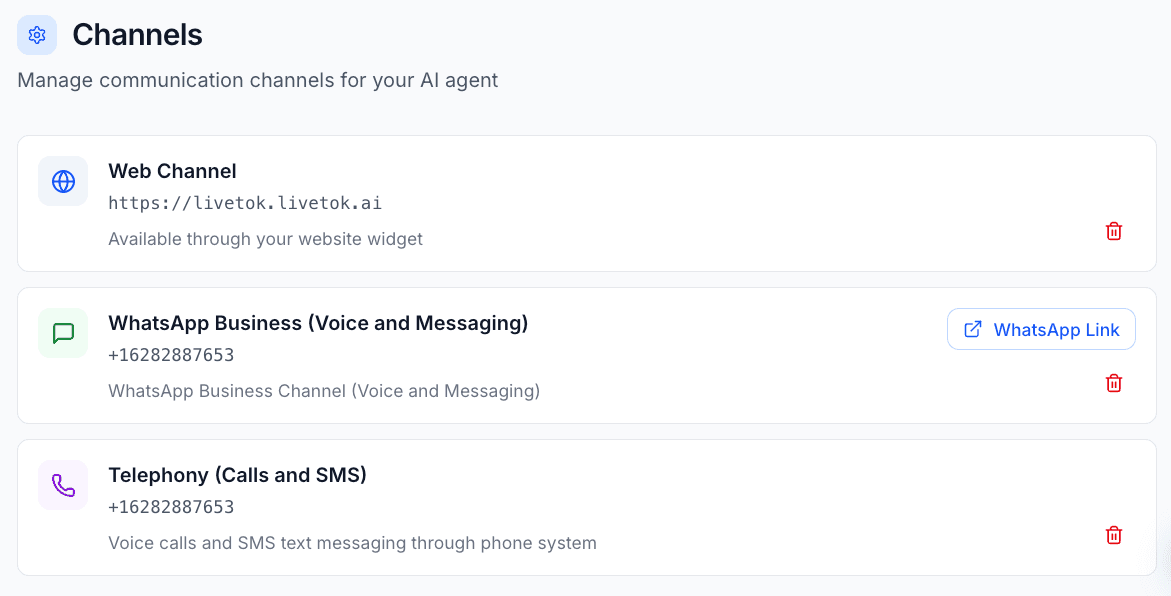
Available Channels
The world’s most popular messaging platform with over 2 billion users.
Supported Content Types:
- Text - Rich formatted text messages
- Voice - Voice messages (audio recordings)
- Images - Photos and image sharing
- Audio Messages - Voice notes and audio clips
Key Features:
- 98% Open Rate - Messages are read almost instantly
- Rich Media - Share images, documents, videos, and location
- Business Profile - Verified business presence with catalog
- Global Reach - Available in 180+ countries
- Two-Way Communication - Natural conversations with context
Best For:
- Businesses with international customers
- High-engagement customer service
- Appointment booking and reminders
- Order updates and notifications
- Personal shopping assistance
Capabilities:
- Text messages with formatting
- Images and videos
- Voice messages and audio
- PDF and document sharing
- Location sharing
- Quick reply buttons
- List messages (menus)
- Template messages for notifications
Telephony
AI-powered voice conversations for inbound calls.
Supported Content Types:
- Calls - Inbound voice calls
- SMS - Text messaging support
Key Features:
- Natural Voice - Human-like AI voice with multiple accents and languages
- Real-Time Processing - Instant response with 0.3s latency
- Call Recording - Automatic transcription and recording
- IVR Replacement - Intelligent routing without button menus
Best For:
- Phone-first businesses (healthcare, professional services)
- High-value customer support
- Appointment confirmations
- After-hours support
Capabilities:
- Inbound call handling
- Call transfer to human agents
- Call recording and transcription
- Multi-language support (25+ languages)
- Custom voice selection
- SMS messaging
Web
Embed an AI chat widget on your website for instant customer engagement.
Supported Content Types:
- Text Messaging - Text-based conversations only
- Voice - Coming soon
Key Features:
- 2-Minute Setup - Deploy with a single line of code
- Fully Customizable - Match your brand colors and style
- Mobile Responsive - Perfect experience on all devices
- No Page Reload - Seamless conversations without interruption
- JavaScript API - Programmatic control and integration
Best For:
- Website visitor engagement
- Lead capture and qualification
- Product recommendations
- FAQ automation
- Support ticket deflection
Capabilities:
- Text-based conversations
- Customizable appearance (colors, position, branding)
- JavaScript API for integration
- Mobile responsive design
- Typing indicators
- Conversation history
- Pre-chat forms
Multi-Channel Strategy
Unified Experience
Your AI Agent maintains conversation context across all channels. A customer can:
- Start a conversation on your website
- Continue via WhatsApp
- Call your phone line
- Resume without repeating information
Channel Routing
Configure automatic channel routing based on:
- Customer preference
- Time of day
- Query complexity
- Agent availability
- Business hours
Channel-Specific Features
Each channel has unique capabilities:
| Feature | Telephony | Web | |
|---|---|---|---|
| Content Types | Text, Voice messages, Images, Audio | Calls, SMS | Text only (Voice coming soon) |
| Quick Deploy | 5-10 minutes | 10-15 minutes | 2 minutes |
| Async Messaging | ✅ Yes | ❌ Real-time only | ✅ Yes |
| Button Menus | ✅ Quick replies, Lists | ❌ No | ❌ No |
| Customizable Appearance | ❌ Fixed by WhatsApp | ❌ Fixed by Phone | ✅ Full customization |
| JavaScript API | ❌ No | ❌ No | ✅ Yes |
| Global Reach | ✅ 180+ countries | ✅ Most countries | ✅ Worldwide |
Getting Started
- Choose Your Primary Channel - Start with the channel your customers prefer
- Configure Your Agent - Set up personality, greeting, and behavior
- Add Integrations - Connect calendars, CRM, and other tools
- Test Thoroughly - Verify all scenarios work correctly
- Go Live - Deploy and monitor performance
- Add More Channels - Expand to additional channels as needed
Best Practices
Channel Selection
Consider your customers:
- Where do they prefer to communicate?
- What age demographic do you serve?
- What type of support do they need?
Consider your business:
- What hours do you operate?
- How complex are typical inquiries?
- Do you need voice or text support?
Configuration Tips
WhatsApp:
- Use rich media to enhance responses
- Keep messages concise (mobile users)
- Use quick reply buttons for common actions
- Respect opt-in/opt-out requirements
Telephony:
- Keep voice responses natural and conversational
- Avoid long monologues - break up information
- Offer options at decision points
- Always provide option to reach human agent
Web:
- Match widget colors to your brand
- Don’t auto-open immediately (intrusive)
- Use proactive messages based on page context
- Optimize for mobile experience
Channel Management
Dashboard
Monitor all channels from a unified dashboard:
- Real-time conversation status
- Channel-specific metrics
- Response time by channel
- Customer satisfaction scores
- Volume trends
[Screenshot placeholder: Multi-channel dashboard]
Channel Settings
Configure each channel independently:
- Navigate to Channels in sidebar
- Select the channel to configure
- Adjust settings:
- Enable/disable channel
- Set business hours
- Configure greeting messages
- Set response behavior
- Configure fallback options
[Screenshot placeholder: Channel settings page]
Testing
Test each channel before going live:
WhatsApp:
- Send various message types
- Test quick replies and buttons
- Verify media sharing works
- Check template message delivery
Telephony:
- Call your number from different phones
- Test various conversation paths
- Verify call transfer works
- Check voicemail handling
Web:
- Test on multiple browsers
- Verify mobile responsiveness
- Check on different screen sizes
- Test with browser extensions enabled
Troubleshooting
WhatsApp Issues
Messages not delivering:
- Verify WhatsApp Business account is active
- Check message template approval status
- Ensure phone number is verified
- Review WhatsApp policy compliance
Rich media not working:
- Check file size limits (16MB for most media)
- Verify file format is supported
- Ensure URL is publicly accessible
- Check media upload permissions
Telephony Issues
Call quality problems:
- Check internet connection stability
- Verify bandwidth requirements
- Test from different locations
- Contact support for carrier issues
Calls not connecting:
- Verify phone number configuration
- Check call routing settings
- Ensure credits/balance available
- Review firewall settings
Web Issues
Widget not showing:
- Check JavaScript console for errors
- Verify embed code is correct
- Clear browser cache
- Check for conflicts with other scripts
Mobile display problems:
- Test on actual devices
- Check viewport meta tag
- Verify responsive CSS
- Review z-index conflicts
Analytics
Track performance across all channels:
- Response Time - Average time to first response
- Resolution Rate - Percentage of queries resolved by AI
- Customer Satisfaction - CSAT scores by channel
- Volume Trends - Messages/calls over time
- Peak Hours - Busiest times by channel
- Handoff Rate - How often AI transfers to human
Next Steps
Need Help?
Contact support or check our Developer Documentation for advanced configuration options.