Telephony Channel Configuration
Configure your LiveTok AI Agent to handle voice conversations through phone calls. Enable natural, human-like voice interactions for inbound calls.
Overview
Telephony provides AI-powered voice conversations for inbound calls with:
- Natural Voice - Human-like AI voice with 0.3s response latency
- Real-Time Processing - Instant understanding and response
- Multi-Language - Support for 25+ languages and accents
- Call Recording - Automatic transcription and recording
- Intelligent Routing - Replace complex IVR systems
- SMS Support - Send and receive text messages
Prerequisites
Before configuring Telephony, ensure you have:
- An active LiveTok account
- A dedicated phone number (or ability to purchase one)
- Business verification documents
- Payment method configured
Initial Setup
Step 1: Access Telephony Settings
- Log in to your LiveTok dashboard
- Navigate to Channels in the sidebar
- Click Add Channel
- Select Telephony
[Screenshot placeholder: Telephony channel selection]
Step 2: Get a Phone Number
Choose your phone number option:
Option A: Use Existing Number (Port In)
- Click Port Existing Number
- Enter your current phone number
- Provide carrier information
- Submit Letter of Authorization (LOA)
- Wait for porting completion (5-10 business days)
Requirements:
- Number must be active for 60+ days with current carrier
- Account in good standing
- Authorization from account owner
Option B: Purchase New Number
- Click Buy New Number from the telephony channel setup dialog
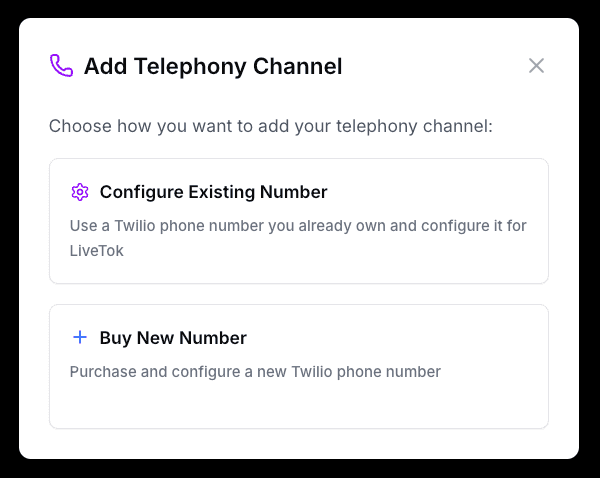
- Select your country from the dropdown
- Choose from available phone numbers in your preferred area
- Review the pricing and click Buy & Configure
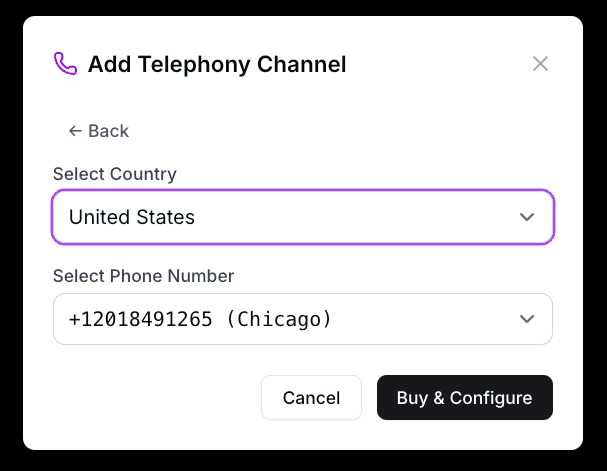
Pricing:
- Local numbers: $1-5/month
- Toll-free numbers: $2-10/month
- International numbers: Varies by country
Step 3: Verify Configuration
- Confirm phone number assignment
- Test inbound call routing
- Verify caller ID settings
- Configure voicemail handling
Voice Configuration
Voice Selection
Choose the voice for your AI Agent:
Voice Options:
English Voices:
- Alloy - Neutral, professional (Default)
- Echo - Warm, friendly
- Fable - Confident, clear
- Onyx - Deep, authoritative
- Nova - Energetic, personable
- Shimmer - Calm, reassuring
Multi-Language Support:
- Spanish (multiple accents)
- French (France, Canadian)
- German
- Italian
- Portuguese (Brazil, Portugal)
- And 20+ more languages
Voice Properties:
- Speed - Adjust speaking rate (0.75x to 1.5x)
- Pitch - Adjust voice pitch (±20%)
- Stability - Voice consistency vs. expressiveness
Example Configuration:
Voice: Nova
Language: English (US)
Speed: 1.0x (normal)
Pitch: 0 (neutral)
Stability: High
```text
**[Screenshot placeholder: Voice selection interface]**
### Voice Behavior
Configure how your agent speaks:
**Speaking Style:**
- **Professional** - Formal, clear enunciation
- **Conversational** - Natural, casual tone
- **Friendly** - Warm, enthusiastic
- **Custom** - Define your own style
**Interruption Handling:**
- **Allow Interruptions** - Let customers interrupt (recommended)
- **Finish Sentences** - Complete thought before listening
- **Smart Detection** - Distinguish interruptions from background noise
**Silence Detection:**
- **Short Pause** - Wait 0.5s before responding
- **Medium Pause** - Wait 1.0s before responding (recommended)
- **Long Pause** - Wait 1.5s before responding
**Background Noise:**
- **Noise Cancellation** - Filter background noise (recommended)
- **Echo Suppression** - Reduce echo in calls
- **Auto Gain Control** - Normalize volume levels
**[Screenshot placeholder: Voice behavior settings]**
## Call Handling
### Inbound Calls
Configure how incoming calls are handled:
#### Greeting
Set the initial greeting customers hear:
**Example Greeting:**
```text
Thank you for calling [Your Business]. This is Alex,
your AI assistant. I can help you with appointments,
product information, and general inquiries.
How can I help you today?
```text
**Best Practices:**
- Keep it under 10 seconds
- State business name clearly
- Introduce the agent
- Mention key capabilities
- End with open question
#### Business Hours
**In-Hours Routing:**
```text
9 AM - 5 PM (Mon-Fri)
→ AI Agent answers
→ Can transfer to human if needed
→ Smart routing based on query type
```text
**After-Hours Routing:**
```text
All other times
→ AI Agent with limited capabilities
→ Take messages for callback
→ Handle urgent issues
→ Book appointments for next day
```text
**Holiday Schedule:**
Configure specific dates when routing differs.
**[Screenshot placeholder: Business hours configuration]**
### Call Transfer
Configure transferring calls to human agents:
**Transfer Triggers:**
- Customer explicitly requests human agent
- AI confidence below threshold (70%)
- Complex query detected
- VIP customer
- After N failed attempts (e.g., 3)
**Transfer Options:**
**Warm Transfer:**
```text
Agent: Let me connect you with a team member who can
help you with that. Please hold for just a moment
while I get them on the line.
[AI briefs human agent privately]
[Human agent joins]
AI: I'm transferring [Customer Name] who needs help with
[Issue]. I've already gathered [Context].
```text
**Cold Transfer:**
```text
Agent: I'm transferring you to our [Department] team.
Please hold.
[Transfers immediately]
```text
**Call Queue:**
- Position in queue announcements
- Estimated wait time
- Option to request callback
- Hold music selection
**[Screenshot placeholder: Call transfer settings]**
## Advanced Features
### Call Recording
All calls are recorded by default:
**Recording Settings:**
- **Auto-record** - All calls recorded (recommended)
- **Selective** - Record based on rules
- **Disabled** - No recording (check local laws)
**Storage:**
- Retention period: 90 days (configurable)
- Automatic transcription
- Searchable transcripts
- Secure storage with encryption
**Compliance:**
- Automatic recording notification (required in many states)
- Consent tracking
- Opt-out option where required
**Recording Announcement:**
```text
This call may be recorded for quality and training purposes.
```text
### Call Analytics
Real-time call tracking:
**Live Metrics:**
- Calls in progress
- Queue length
- Average wait time
- Agent availability
**Historical Metrics:**
- Call volume trends
- Average call duration
- Resolution rate
- Transfer rate
- Customer satisfaction
**[Screenshot placeholder: Call analytics dashboard]**
### Multi-Language Detection
Automatically detect and respond in customer's language:
**Supported Languages:**
- English (US, UK, AU, etc.)
- Spanish (Spain, Latin America)
- French, German, Italian
- Portuguese, Dutch, Polish
- Chinese (Mandarin), Japanese
- Arabic, Hindi, Korean
- And 15+ more
**Configuration:**
```text
Primary Language: English (US)
Auto-Detect: Enabled
Fallback: English
Supported Languages: All (or select specific)
```text
**Example Flow:**
```text
Customer: "Hola, necesito hacer una cita"
Agent (in Spanish): "¡Hola! Con gusto te ayudo a agendar
una cita. ¿Qué día te gustaría venir?"
```text
## Integration Settings
### Calendar Integration
Enable appointment booking through phone calls:
**Supported Calendars:**
- Google Calendar
- Calendly
- Microsoft Outlook
- Custom calendar API
**Voice Booking Flow:**
```text
Customer: I need to book an appointment
Agent: I'd be happy to help you schedule an appointment.
What type of service are you looking for?
Customer: Haircut
Agent: Great! I have availability this week. Would Tuesday
at 2 PM or Thursday at 10 AM work better for you?
Customer: Tuesday at 2
Agent: Perfect! I've scheduled you for a haircut on Tuesday,
March 14th at 2 PM. You'll receive a confirmation via text.
Is there anything else I can help you with?
```text
[Learn more about Calendar integration →](/integrations/google-calendar)
**[Screenshot placeholder: Calendar integration settings]**
### CRM Integration
Sync call data with your CRM:
**Supported CRMs:**
- HubSpot
- Salesforce
- FreshDesk
- Custom API
**Synced Data:**
- Call recordings and transcripts
- Customer information
- Call outcomes and notes
- Follow-up tasks
- Lead scoring updates
[Learn more about CRM integrations →](/integrations/hubspot)
### SMS Messaging
Send and receive SMS messages:
**Use Cases:**
- Appointment confirmations
- Follow-up after calls
- Information sharing
- Customer communication
- Custom notifications
**Example SMS:**
```text
Hi [Name], this is [Your Business]. Your appointment
is confirmed for tomorrow at 2 PM. Reply YES to confirm
or call us at [Number] to reschedule.
```text
## Testing
### Pre-Launch Testing
Test thoroughly before going live:
#### Test Scenarios
1. **Basic Inquiry**
- Call and ask simple question
- Verify voice quality
- Check response accuracy
2. **Appointment Booking**
- Request appointment
- Verify calendar integration
- Check confirmation delivery
3. **Complex Query**
- Ask multi-part question
- Test context retention
- Verify escalation if needed
4. **Transfer Scenario**
- Request human agent
- Verify transfer works
- Check context passed correctly
5. **After-Hours Call**
- Call outside business hours
- Verify after-hours message
- Check limited functionality
6. **Multi-Language**
- Call and speak different language
- Verify detection works
- Check response quality
**[Screenshot placeholder: Test call logs]**
### Test Checklist
- [ ] Phone number routes correctly
- [ ] Greeting plays properly
- [ ] Voice quality is clear
- [ ] Agent understands queries
- [ ] Responses are accurate
- [ ] Context is maintained
- [ ] Calendar booking works
- [ ] Call transfer functions
- [ ] Transcription is accurate
- [ ] After-hours routing works
- [ ] Multi-language detection works
- [ ] Recording and playback work
- [ ] CRM integration syncs
- [ ] SMS messaging works
### Load Testing
Test high call volume:
- Simulate multiple concurrent calls
- Verify queue handling
- Check for audio quality degradation
- Monitor system performance
- Test failover scenarios
## Monitoring & Management
### Live Call Monitoring
Monitor active calls in real-time:
**Dashboard View:**
- Calls in progress
- Call duration
- Current conversation state
- Agent confidence level
- Transfer queue status
**Actions:**
- Listen to live call
- Join call as supervisor
- Take over call
- Send notes to agent
- End call if needed
**[Screenshot placeholder: Live call monitoring dashboard]**
### Call History
Review past calls:
**Search & Filter:**
- Date range
- Phone number
- Duration
- Outcome (resolved, transferred, voicemail)
- Customer sentiment
- Agent performance
**Call Details:**
- Full transcript
- Audio recording
- Duration and timestamps
- Outcome and notes
- Follow-up actions
- Customer feedback
**[Screenshot placeholder: Call history view]**
### Performance Metrics
Track telephony channel performance:
**Volume Metrics:**
- Total inbound calls
- Answered calls
- Missed calls
- Average calls per day
- Peak hour volume
**Quality Metrics:**
- Average call duration
- First call resolution rate
- Transfer rate
- Customer satisfaction score
**Efficiency Metrics:**
- Average wait time
- Average handle time
- After-call work time
- Concurrent call capacity
[View detailed analytics →](/reporting)
## Troubleshooting
### Common Issues
#### Poor Voice Quality
**Possible Causes:**
- Network connectivity issues
- Bandwidth limitations
- Codec incompatibility
- Hardware problems
**Solutions:**
- Check internet connection (min 100 kbps per call)
- Use wired connection instead of WiFi
- Disable VPN if causing issues
- Test from different location
- Contact support for carrier-level issues
#### Agent Not Understanding
**Possible Causes:**
- Background noise
- Accent/dialect not trained
- Complex industry jargon
- Poor audio quality
- Insufficient training data
**Solutions:**
- Enable noise cancellation
- Add custom vocabulary for industry terms
- Train with more example conversations
- Improve audio input quality
- Add pronunciation guides for specific terms
#### Call Connection Failures
**Possible Causes:**
- Phone number not provisioned
- Carrier routing issues
- Number porting incomplete
- Configuration errors
**Solutions:**
- Verify number status
- Check routing configuration
- Confirm porting completed
- Review firewall/network settings
- Contact carrier support
#### High Transfer Rate
**Possible Causes:**
- AI not sufficiently trained
- Complex queries beyond scope
- Integration failures
- Confidence threshold too high
**Solutions:**
- Add more training data
- Review transfer conversation patterns
- Fix integration issues
- Adjust confidence threshold
- Refine routing rules
## Best Practices
### Voice Design
**Do:**
- Use natural, conversational language
- Speak at moderate pace
- Pause between sections
- Vary tone to maintain interest
- Use confirmations ("Got it", "Perfect")
**Don't:**
- Use robotic or unnatural phrasing
- Speak too fast
- Use complex vocabulary unnecessarily
- Have long monologues
- Sound too repetitive
### Conversation Design
**Do:**
- Ask clarifying questions
- Confirm understanding
- Set clear expectations
- Provide progress updates
- Offer clear next steps
**Don't:**
- Make assumptions
- Ask multiple questions at once
- Leave long silences unexplained
- Use ambiguous language
- Rush the conversation
### Error Handling
**Do:**
- Acknowledge when you don't understand
- Ask customer to repeat or rephrase
- Offer alternatives
- Escalate gracefully when needed
**Don't:**
- Keep asking same question repeatedly
- Pretend to understand when you don't
- Blame the customer
- Give up after one failed attempt
**Example Recovery:**
```text
Agent: I'm sorry, I didn't quite catch that. Could you
please repeat that for me?
[Customer repeats]
Agent: Thank you. Just to make sure I understand correctly,
you're looking to [restate]. Is that right?
```text
### Hold and Wait Times
**Do:**
- Explain reason for hold
- Provide estimated wait time
- Check back periodically
- Thank customer for patience
**Don't:**
- Put on hold without explanation
- Leave on hold for extended periods without update
- Return from hold without acknowledgment
**Example:**
```text
Agent: I need to look that up for you. Can you hold for
about 30 seconds while I check?
[After 30 seconds]
Agent: Thank you for holding. I found that information
for you...
```text
## Compliance & Legal
### Recording Consent
**Two-Party Consent States:** (US)
California, Connecticut, Florida, Illinois, Maryland,
Massachusetts, Montana, New Hampshire, Pennsylvania,
Washington
**Requirements:**
- Inform all parties before recording
- Obtain consent
- Allow opt-out option
- Document consent
**Compliant Announcement:**
```text
This call is being recorded for quality and training purposes.
By continuing this call, you consent to being recorded.
If you do not wish to be recorded, please let me know now.
```text
### TCPA Compliance (US)
**Do Not Call Registry:**
- Check numbers against DNC list
- Honor company-specific opt-outs
- Maintain internal suppression list
**Calling Hours:**
- Only call 8 AM - 9 PM (recipient's local time)
- Respect time zones
**Consent Requirements:**
- Obtain prior express written consent for marketing calls
- Keep consent records
- Honor revocation requests immediately
### International Considerations
**GDPR (Europe):**
- Obtain consent for processing voice data
- Right to access recordings
- Right to deletion
- Data retention limits
**Other Regions:**
Check local regulations for:
- Recording consent requirements
- Data storage requirements
- Calling hour restrictions
- Do Not Call registries
## Pricing
### Call Costs
**Inbound Calls:**
- Local/toll-free: $0.01-0.02 per minute
- International: $0.05-0.30 per minute (varies by country)
**Phone Numbers:**
- Local numbers: $1-5 per month
- Toll-free numbers: $2-10 per month
- Premium numbers: Custom pricing
**SMS Messaging:**
- Outbound SMS: $0.01-0.02 per message
- Inbound SMS: Free
**Additional Costs:**
- Recording storage: Included for 90 days
- Transcription: Included
- Extended retention: $0.01 per hour per month
## Next Steps
- [Configure WhatsApp Channel](/channels/whatsapp)
- [Set Up Web Widget](/channels/web)
- [Add Calendar Integration](/integrations/google-calendar)
- [Connect CRM](/integrations/hubspot)
- [Build Knowledge Base](/knowledge-base)
## Support
Need help with Telephony configuration?
- Contact support at support@livetok.ai
- Check [Developer Documentation](/developers)
- Review [API Reference](/developers/api)